
Windows AI Foundry: Building Privacy-Focused AI Apps on Windows
Windows AI Foundry is a comprehensive platform designed to help developers integrate AI capabilities directly into Windows applications. At its core, it focuses on running AI models locally on Windows devices, leveraging hardware acceleration for optimal performance. Instead of relying on cloud services, it provides a set of tools, APIs, and built-in models that execute right on your PC, laptop, or private server.
This local-first approach empowers developers to build intelligent, privacy-focused applications that take full advantage of Windows hardware. Even if a device is not connected to the internet, models can still run securely and privately. There are no external service calls, no hidden data transfers, and no dependency on third-party providers. Everything stays on the device.
Why Use Windows AI Foundry?
Windows AI Foundry is built for scenarios where privacy, security, and offline capability matter. Typical use cases include:
-
Text summarization and reporting
-
Semantic search for content discovery
-
Image generation, upscaling, and sharpening
-
Video upscaling
-
Object detection and image segmentation
-
Text recognition from images and scanned documents
If you want a secure ecosystem without sending data to large language models hosted on the internet, Windows AI Foundry offers an infrastructure tailored for specific scenarios and use cases that do not interact with the external world.
Local Execution with Foundry Local
At the heart of the ecosystem is Foundry Local. This is the core mechanism that allows AI models to run within your own infrastructure—on a PC, laptop, or private server. Windows AI Foundry is focused on the Windows operating system, while Azure AI Foundry (also known as Microsoft Foundry) provides a cloud-based alternative.
If your application needs to stay entirely on a Windows device for privacy or compliance reasons, Foundry Local is the ideal choice. It gives you control over model execution, storage, and customization, all within a local environment.
Built-In Models and Ready-to-Use APIs
Windows AI Foundry includes built-in models and ready-to-use APIs. For example:
-
Silica, a small language model for text generation optimized for NPU
-
Text recognition to extract text from images or scanned documents
-
Image description and semantic search
-
Image scaling, sharpening, and object removal
-
Object identification
These services run entirely within the operating system. You do not need to connect to the internet or use third-party services. While only a few examples are listed here, the possibilities are practically endless. You can perform many of the same operations typically handled by cloud services, but locally within Windows AI Foundry.
Fine-Tuning and Model Customization
Developers can fine-tune built-in models using low-rank adaptation (LoRA). Windows AI Foundry integrates with Foundry Local, which serves as the centerpiece of the ecosystem. Developers can browse, test, and deploy open-source models optimized for CPU, GPU, and NPU.
This flexibility allows you to select the right model for your use case—whether it’s text, images, audio, or code—and adapt it to your specific needs.
ONNX and Cross-Hardware Compatibility
A key concept behind Windows AI Foundry is ONNX (Open Neural Network Exchange). Windows ML acts as the AI inferencing runtime, simplifying deployment of custom ONNX models across different hardware types.
This means models built by Meta, Google, Microsoft, and others can all interoperate. You are not tied to a single provider, and your models remain portable and compatible across CPUs, GPUs, and NPUs.
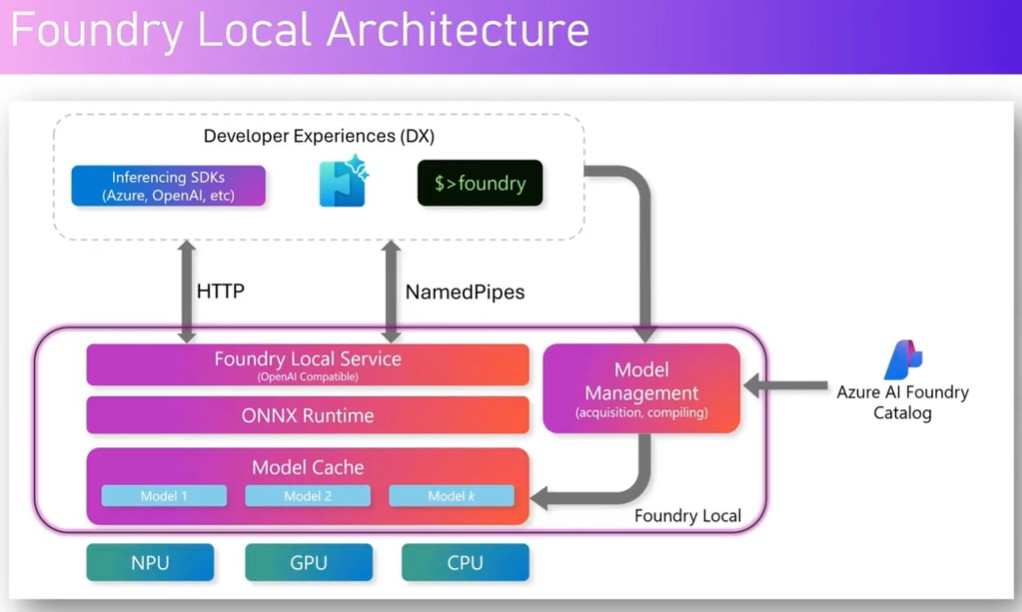
Foundry Local Architecture in a Nutshell
The Foundry Local architecture consists of several layers:
-
Hardware layer: CPU, GPU, and NPU on a server, laptop, or PC
-
Developer experience: Command line tools, SDKs, or applications used to interact with models
-
Model management: Acquisition, compilation, downloading, and caching of models locally
-
Communication layer: HTTP or named pipes to talk to the Foundry Local service
-
Runtime layer: ONNX runtime for model execution
-
Model cache: Local storage for downloaded or linked models
This design allows models from different providers to run in a unified environment, all within your local infrastructure.
Exploring Models and APIs with AI Dev Gallery
Windows AI Foundry includes a Windows Store application called AI Dev Gallery. It provides sample models, APIs, and ready-to-run examples, such as:
-
Image classification
-
Object detection
-
Image segmentation
-
Audio transcription
-
Text translation
-
Text generation and summarization
-
Image super-resolution
You can select a predefined model, download a new one, or load a model from disk. The system adapts to your hardware configuration—CPU, GPU, or NPU—and offers suitable models based on your device’s capabilities.
Each sample can be exported into Visual Studio Code, complete with source code, so you can inspect, modify, and integrate it into your own application.
Installing and Using Foundry Local
Installing Foundry Local is straightforward. It works much like installing a standard application. Once installed, it provides a command-line interface and a local service that manages model execution.
From the command line, you can list available models, download them, load them into memory, and run them. Models are cached locally, so once a model is downloaded, it can be reused without repeating the download.
You can then send prompts to a locally running model. Since the model is offline, it answers based on its internal knowledge and training data. It does not access the internet or external services, making it ideal for privacy-sensitive applications.
Windows AI Foundry vs. Azure AI Foundry
Windows AI Foundry is designed for local execution on Windows devices. Azure AI Foundry, on the other hand, is a cloud-based solution that offers a broader set of models, tools, and services.
If you want to build a cloud-hosted AI application with rich integrations, Azure AI Foundry is the right choice. If you need a self-contained application that runs entirely on a local PC or within a private infrastructure, Windows AI Foundry is the better fit.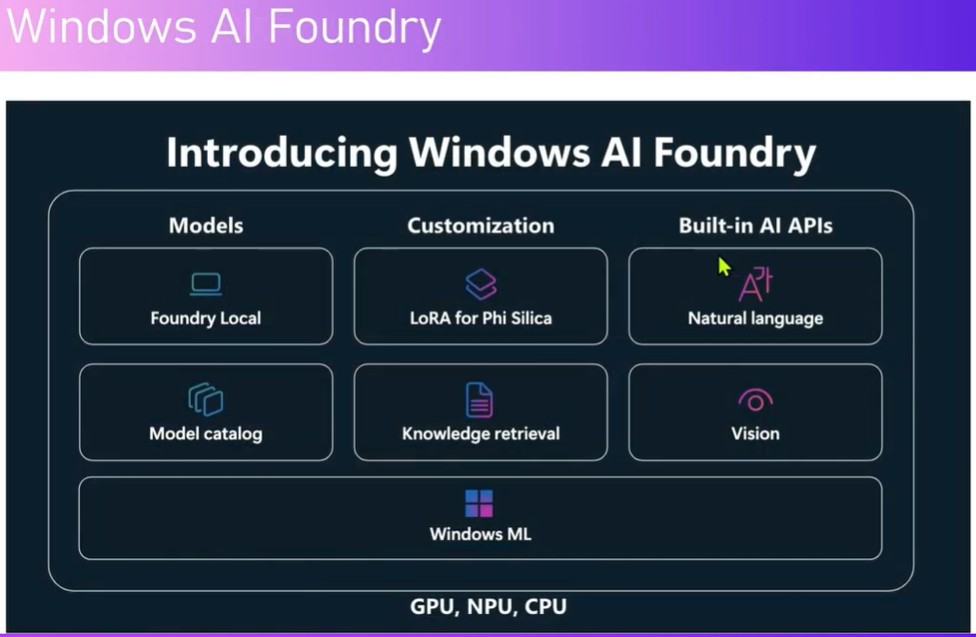
Final Thoughts
Windows AI Foundry brings powerful AI capabilities directly to Windows devices. With local execution, built-in models, ONNX compatibility, and seamless hardware acceleration, it enables developers to build secure, privacy-focused, and offline-capable AI applications.
Whether you are generating text, analyzing images, transcribing audio, or performing semantic search, Windows AI Foundry offers a flexible ecosystem that works across devices, models, and hardware—without sending your data to the cloud.